Summary
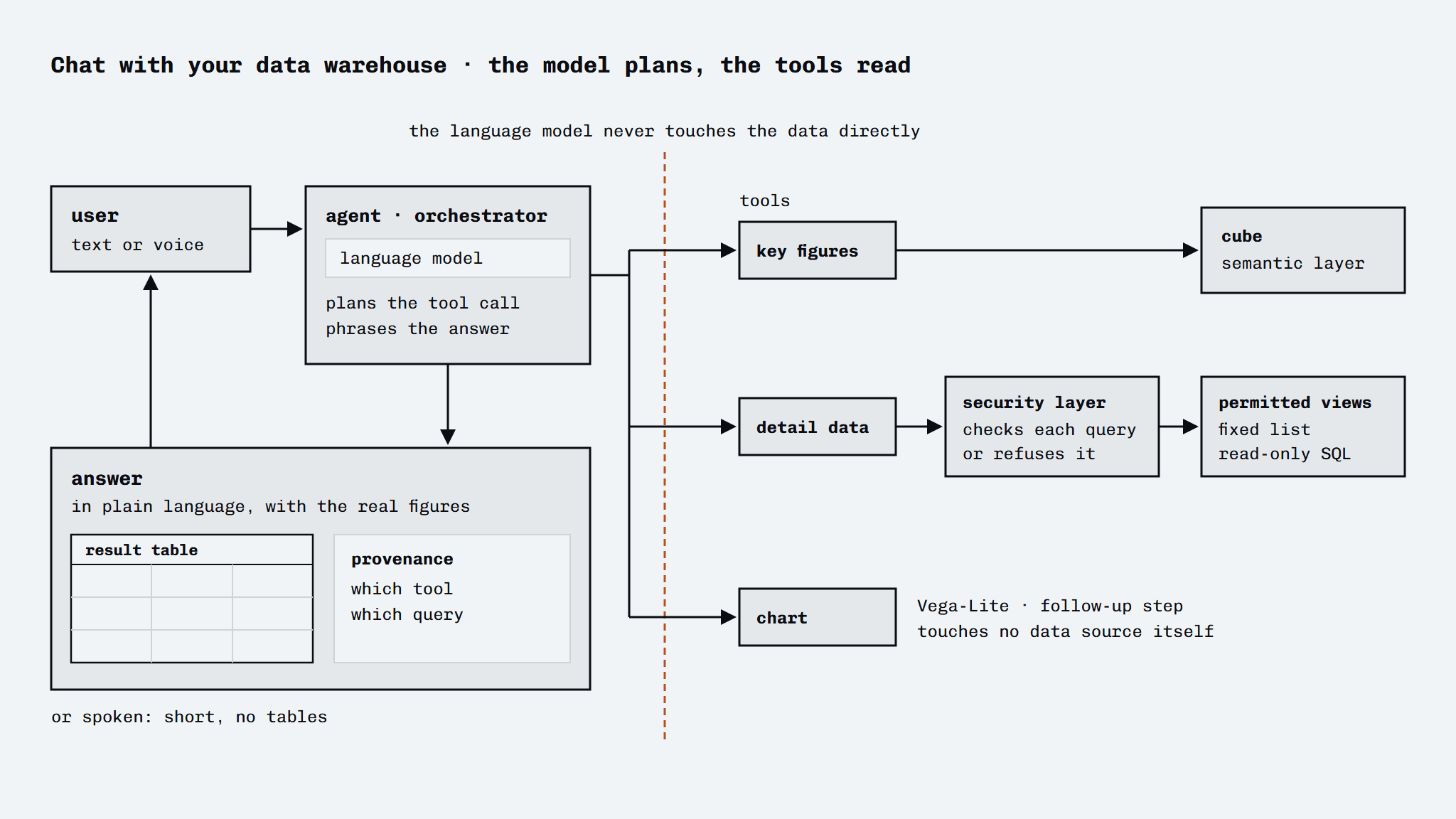
An agent that lets staff put questions to the data warehouse in plain language, as an addition to the existing Power BI reports, not as a replacement. The agent turns a question into a planned tool call, has a separate security layer run the query, and phrases the answer with the real figures attached. On request it draws the result as a chart, and through a voice layer a question can also be spoken, with a short spoken answer in return. The system is built as a modular monolith: one application, split internally into separate modules with a fixed interface that can be switched on or off per environment. The core that guards the scope, a list of permitted sources and fields, is maintained separately as the most important piece of knowledge in the system.
The brief
Find out whether staff can ask questions in natural language about data from the data warehouse, without the language model ever getting direct access to the data warehouse or to information it is not allowed to see.
What I built
- An orchestrator that plans a question, calls the right tool and reports the result back
- A tool that fetches key figures by turning natural language into a query on a semantic layer (cube)
- A tool that fetches detail data through a secured, read-only SQL layer on a fixed list of permitted views
- A security layer that checks every query and lets through only read statements on those permitted views
- An extensible module registry that lets parts be switched on or off per environment
- A light chat interface that shows, besides the answer, the result table and where it came from (which tool, which query)
- A chart tool that draws the result of the last successful query as a Vega-Lite chart inside the answer (bar, line, point or area); the language model only picks the presentation, and the figures come straight from the query without passing through the model
- A voice layer on the same chat interface: speaking a question after a wake word, interrupting with a stop command, and a separate short answer in spoken language without tables or long strings of figures
In detail
- Two data sources, one entrance: key figures from the semantic cube layer (the same figures as in Power BI), detail data through a tightly bounded SQL route; the agent picks the route that fits
- A security layer between language model and data: every generated query is validated, only read statements on an approved list get through, so the language model can never request data that has not been released
- Provenance with every answer: alongside the answer in prose, the interface shows the result table and which tool and query produced it
- An extensible module setup: a new capability is added as a standalone module, switchable per environment, without touching the core logic
- Refusing outside scope: questions that fall outside the permitted sources are recognised and turned down instead of answered with something made up
- Chart or spoken answer on request: the chart draws exactly the rows from the last successful query, not whatever the language model passes on, and the voice layer keeps the assistant from picking up its own spoken answer as a new question
Outcome
Works end to end, with key figures straight from the production cube, and is covered by about 180 Python tests and 13 JavaScript tests. Three parts were still open at the last state: a document search function (the underlying search infrastructure was switched off for the time being), an alternative REST connection to the cube layer that still had to be verified against a real dataset, and speech recognition, which ran through the browser (Chrome and Edge) and had to move to Azure Speech in the EU region for production use.