Summary
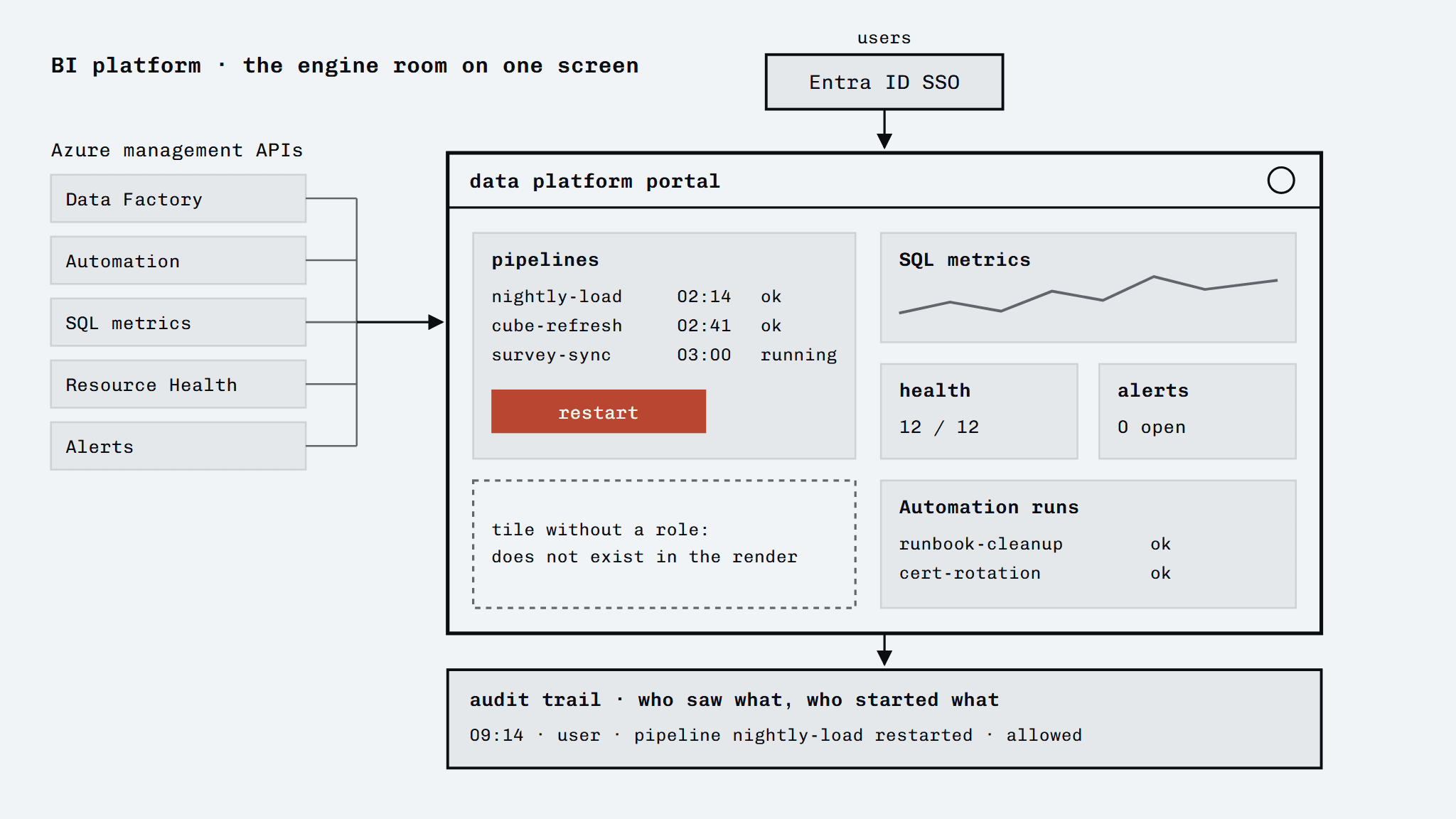
An internal BI and data platform portal built for a large Dutch company: a bento-style home screen with tiles that hook straight into the Azure environment. From that one screen, Data Factory pipelines, Automation runs, SQL metrics, resource health and alerts can be followed, and pipelines can be triggered again by hand. Access runs through Microsoft Entra ID SSO, with role-based authorisation per tile and an audit trail of who saw or did what. The platform replaces the loose overview that used to sit spread across several Azure portals.
The brief
Build one overview screen for the Azure data infrastructure, so operations no longer has to switch between separate Azure portals to see whether pipelines are running and resources are healthy, including the option to step in without handing out full Azure rights.
What I built
- A bento dashboard with tiles for pipeline monitoring, Automation runs, SQL metrics, resource health and alerts, each with live data from the Azure management APIs
- Triggering Data Factory pipelines by hand through webhooks, straight from a tile
- Analysis Services management (pause and resume) through a purpose-made Azure role that allows only those two actions, not full management
- Sign-in through Microsoft Entra ID SSO, with role-based access per tile and audit logging in Azure SQL
- A database layer of its own (Azure SQL) for users, permissions and audit events, with schema management through migrations separate from the runtime
- Deployment on Azure App Service with OIDC-based CI/CD through GitHub Actions, without long-lived secrets
In detail
- Pipeline monitoring and intervention in one place: a tile shows the status of pipelines and can restart them, without the user having to sign in to Azure
- Resource health and alerts at a glance, so failures are visible before they escalate
- Management with minimal rights: pausing or resuming Analysis Services runs through a role that allows only those actions, instead of full management rights
- Authorisation per tile with an audit trail: tiles a user has no role for simply do not exist in the render, and every action is logged for traceability
- Secretless deployment: CI/CD with an OIDC sign-in to Azure, so no long-lived deploy secrets in the repository
Outcome
Rolled out on production infrastructure (Azure App Service) and in use as an internal overview platform, with an ongoing release rhythm.