Summary
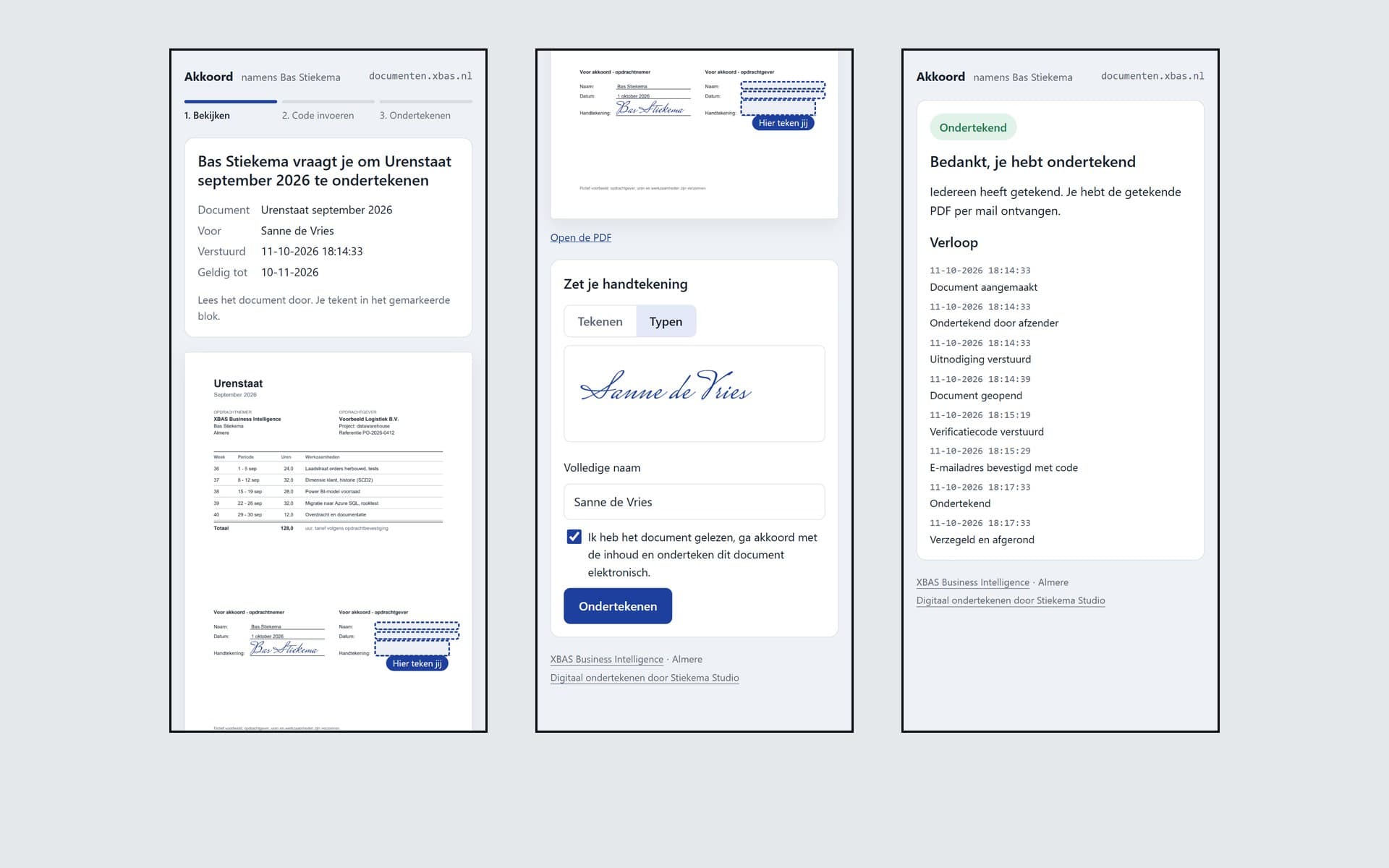
Akkoord is a service of my own for having documents signed online. The sender sends a PDF through the API, the signer gets a link by e-mail, views the document, confirms with a six-digit code that the e-mail address is right, and signs with a finger, the mouse or a typed name. No account or app is needed. After the last signature the service adds an audit page to the end of the PDF and seals the whole thing with its own certificate and a timestamp from DigiCert. That makes any change after signing visible in Acrobat. Both parties get the sealed PDF by e-mail. The first use is my monthly timesheet, which the client signs off before the invoice goes out.
The brief
My timesheet went back and forth by e-mail as a PDF every month. DocuSign solves that, but then I pay a subscription for a handful of documents and they sit with another party. I wanted the same evidence as DocuSign, so not just a picture of a signature. A signer who demonstrably controls the e-mail address, a recorded history, and a PDF that shows whether anything changed after signing. On my own server, and with an API, so that my timesheet portal can send a timesheet for signing with one button.
What I built
- A signing page in three steps (view, enter code, sign) that works on phone and laptop, without an account. Sign with a finger or the mouse, or type the name in a handwriting font
- A six-digit code by e-mail, valid for ten minutes, with five attempts per code and at most three codes per hour. The code only goes out after a click on the button and not when the link is opened, because mail scanners open links in advance
- An audit trail that can only be added to. Database triggers refuse every change and every deletion, and each event holds the SHA-256 of the previous one, so the whole chain can be recalculated
- Sealing with pyHanko to PAdES-B-LT, with an own certificate authority whose root key is kept offline, an RFC 3161 timestamp from DigiCert with Sectigo as fallback, and certification set to 'no changes allowed'
- An audit page at the end of the PDF with the fingerprint of the original and of the document as shown, the signers with a masked e-mail address, and every event with time, IP address and browser
- Fields through invisible anchors in the PDF, so the caller only produces the document and the service looks up the positions itself. Alongside that an API for creating, status and retrieval, and an admin screen for declining, voiding and reminding
In detail
- Never an unsealed PDF as signed. If the timestamp service cannot be reached, the signer still gets a confirmation, the document waits and a background task seals it later, with an alert to me if that has not worked after an hour
- What the signer sees is what gets signed. The fingerprint of the document as shown is on the signing page, and the server checks it again at the moment of signing
- Resistant to mail scanners and double clicks. Opening the link only records 'opened', and pressing Sign twice produces exactly one signature
- Link tokens and codes are stored only as a hash in the database. The signing session after the code lasts 30 minutes and belongs to that one browser, so forwarding the link is not enough to sign
- Self-hosted, with SQLite and the documents on disk in the existing hourly backup, and an alert through Telegram on signed, declined or expired
Outcome
Live since October 2026 at documenten.xbas.nl, with 227 tests covering the sealing, the audit trail, the codes and the signing flow, two of them against the real timestamp services. Legally it is a simple electronic signature with a full evidence package, the same level as DocuSign's standard signature, and enough for quotes, engagement letters and most business contracts. For wider use the next steps are placing fields by drag and drop on any PDF, multiple senders with their own branding, iDIN as a stronger identity check, and a publicly trusted certificate, so that Acrobat shows a green tick instead of 'identity unknown'.